// Guide · Claude + Fuzzframe
How to make a motion-graphics video with Claude
Six steps in one Claude chat. Claude writes and animates; Fuzzframe adds the voice, music and sound, and renders the MP4. Here’s how we made this reel.
6 stepsabout 45 min in the chatUpdated
You need Fuzzframe credits and a Claude plan that can add custom connectors.
In this guide · 6 steps
Who this is for, and what the video says
Anyone who teaches in short videos without being on camera: a faceless educational channel, a teacher, a coach, a marketer. The reel busts one myth. The famous eight-second attention span has no study behind it: in 2017 a BBC reporter traced it to a 2015 marketing report whose own sources could find no such research. What psychologist Gloria Mark measured is how long people at work stay on one screen before switching: two and a half minutes in 2004, 47 seconds in studies from 2016 to 2020. That’s switching, not how long people can focus.
Connect Claude
Press Add to Claude: Claude opens with Fuzzframe already filled in, so you press Continue. Then press Connect next to Fuzzframe, sign in to Fuzzframe and press Allow. You do this once.
Add to Claude ↗Paste the prompt
Start a new chat, paste this and fill in the brackets. Leave out any line and Claude asks you.
Use Fuzzframe. Make a motion-graphics [explainer / knowledge reel / product video] about [your topic], vertical, about [60] seconds, for [who it's for].

Script: [paste your script and add "Keep every word exactly as written", or write "Write the script for me and show it to me before you record."]

Cover headline: "[3 to 8 words]" with "[key word]" as the key word.

Visual idea: [one picture that carries the whole film, e.g. an everyday analogy]. Facts stay literal on screen ([the names, years and numbers you mention]).

Voice: [how it should sound, e.g. a calm, natural, conversational narrator].

Look: help me pick one, 2D only.

Music: scored, quiet under the facts, building into "[a line near the end]", peaking on the last line.
The exact prompt we used
Use Fuzzframe. Make a motion-graphics knowledge reel, vertical, about 75 seconds, from this fact-checked voiceover. Keep every word exactly as written (group the lines into paragraphs yourself). Cover headline: "The 8-second attention span? No study." with "No study" as the key word. Voiceover, one line per sentence: The famous eight-second human attention span has no study behind it. | In twenty seventeen, a BBC reporter followed the number back to its source. | It sat in a twenty fifteen marketing report, but that report cited a statistics website. | Its two listed sources could find no such research. | And the goldfish? | A fish researcher told him goldfish are a standard animal for memory research. | Psychologist Gloria Mark timed how long people at work stay on one screen before switching. | In her first study, published in two thousand and four, it was two and a half minutes. | In studies from twenty sixteen to twenty twenty, it was forty-seven seconds. | She calls that a shrinking attention span. | But it measures switching, not how long people can focus. | On a phone feed, something else is always one swipe away. | So the fix is not to cut your story to eight seconds. | It's to make every line worth more than the next swipe. | A ninety-second story that keeps paying is not too long. | A fifteen-second one that says nothing is. --- Visual idea: one home analogy, a buffet: people move on to the next dish when it looks better, not when they are full. Show it beside the real thing (screen switching), then let the counter of dishes become a feed of videos. Facts stay literal on screen (the BBC, the 2015 report, 2004: 2 min 30 s, 2016 to 2020: 47 s, Gloria Mark). Voice: a calm, natural, conversational male narrator, I'd like Mark. Look: help me pick one, 2D only (no 3D pieces), because 3D films can't be exported yet. Music: scored, quiet under the facts, building into "So the fix is not to cut your story", peaking on the last line.
Pick a look and voice
Claude’s first reply shows every look moving. Tap one and Claude picks the rest: it shows you a short brief (the look, the voice, the first line) with the estimate, and starts when you press Make it. To decide every step yourself (what we did here), tap or choose each step under the looks.
 Fuzzframe · looksUnverified
Pick a look
Every preview animates the same three lines, so you see only the look. Choose one here, or tell Claude its name.
Choosing each step, you then see your own title on three looks and can try colours under the one you like. After that, play the voices Claude suggests and pick one.
Claude asks before it records the voice, once. The film is timed to that take.
Approve the storyboard
Before any animation, Claude shows the plan scene by scene, with a rough frame of each scene in your look. Change any scene or approve it.
Fuzzframe · save_storyboardUnverifiedStoryboard · for your approval
The 8-second attention span myth
A newsroom fact-check on one long sheet of paper. An orange tracer dot follows the 8-second claim back through its citations and finds nothing. Then it draws Gloria Mark's real numbers, hops along a buffet counter beside the switching screens, and the counter tips upright into a phone feed. The ending compares two stacked lanes: a 90-second story that keeps paying and a 15-second one that says nothing.
The 8-second attention span?
No study.
0:00–0:05 Cover
“The famous eight-second human attention span has no study behind it.”
On screenHeadline (frame 0, fully drawn): "The 8-second attention span?" with "No study." big in orange. Below: an empty chart with a dashed "8 s" line across it and a source line that reads "Source: —". Then the spoken words "no study behind it" underline on cue.
▸ Hero object and motion
Change this beatFix with notes
You get a first look, one frame per scene. Tap what’s off (Too empty, Hard to read…) and Claude fixes only those scenes.
Fuzzframe · reviewUnverifiedFirst look · version 17
The 8-second attention span myth
One frame per scene, before any polish. Is this the direction? Tap what's off, or say it looks right.
Watch with sound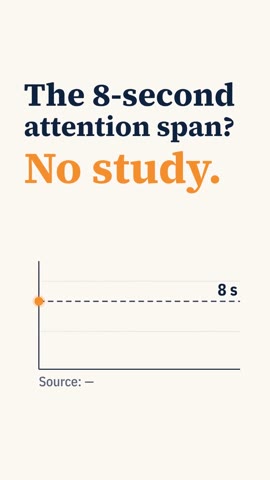
0:00–0:05 1. Hook
“The famous eight-second human attention span has no study behind it.”
Export and download
Watch the draft with sound, then say “Export it.” Claude replies with a download link and captions to post. The MP4 is also kept in Videos in Fuzzframe, where you can download it again any time.
Used Fuzzframe, updated tasks, ran 2 commands ›
The HD export is finished: 1080×1920, 60 fps, 65.75 seconds. Download the MP4. The link expires in about 6 hours, so save it soon. After that, you can still get it from the video in Fuzzframe, under your Knowledge reels series.
Instagram Reels
The “8-second attention span”? There’s no study behind it.
A BBC reporter traced it in 2017: a marketing report citing a statistics website whose own sources found no such research. Gloria Mark’s real numbers measure screen-switching (2½ min in 2004, 47 s in 2016–2020), not focus.
Sources: BBC (2017); Gloria Mark’s research on attention at work
#attentionspan #storytelling #contentcreator #mythbusting
The video's page in Fuzzframe
Open the video in Videos. Next to the player you’ll find Edit in Claude, Download MP4 and the caption to post. On a phone, Post to TikTok / Instagram copies the caption as you tap.
To change the voice or music volume, open More options → Adjust and drag while the video plays. That’s free, and the next export keeps it.
An illustrated story instead
Same chat, same connector. Ask for an illustrated story, or tap a story look in the first card. Claude writes the script with you, then you pick one of the story looks (or upload a picture whose style you like) and a voice. Claude plans every scene and Fuzzframe paints a picture for each one, records the voice and exports the MP4, all without leaving the chat.
Use Fuzzframe. Make an illustrated story about [your idea], vertical, about [60] seconds, for [who it's for]. [Paste your script and add "Keep every word exactly as written", or write "Write the script for me and show it to me first."]
Tips for your own topic
- One clear claim first: a number, a date or a reversal.
- One picture for the whole film: an everyday analogy beats a new card per line.
- Your own script? Paste it and say “keep every word”.
- Tap notes, not essays: Claude changes only what you point at.
Questions
Can Claude make videos?
What uses my credits?
Why “2D only”?
Claude says it can’t find a tool
Can I change it after exporting?
Ready to make yours?
Connect Claude once, then every video starts with one message.
Connect Claude